
ナレーション
国際化
Learn how to translate ink text in Pixi’VN using a library like i18next and the onInkTranslate function.
As explained in more detail here, Pixi’VN gives the possibility to translate the game text using a library, such as i18next. Also in ink + Pixi’VN integration you can use a library to translate the text of the ink.
Pixi’VN gives the developer the ability to intercept the translation event with the onInkTranslate function.
import { onInkTranslate } from "@drincs/pixi-vn-ink";
import { useEffect } from "react";
import { useTranslation } from "react-i18next";

export default function useInkInitialization() {
    const { t } = useTranslation(["narration"]);
    useEffect(() => {
        onInkTranslate(t);
    }, [t]);

    return null;
}
Auto-generation of translation files
テンプレート
In all templates, you can use the following button in the settings to automatically generate the json file that will be used for translations.
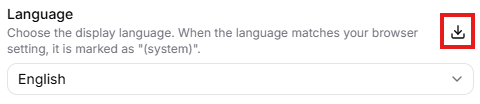
To facilitate the creation of the translation files, you can use the generateJsonInkTranslation function to automatically generate the JSON structure from the ink text.
import { generateJsonInkTranslation } from "@drincs/pixi-vn-ink";
import i18n from "i18next";
import { convertInkToJson } from "./utils/ink-utility";

function getLocalesResource(
    lng: string,
): Promise<Record<string, Record<string, string>>> {
    return import(`./../locales/${lng}.json`);
}

async function generateResourceToTranslate(lng: string): Promise<any> {
    let res = await getLocalesResource(lng);
    res = { ...res };
    if (!res) {
        res = {};
    }
    if (!res.narration) {
        res.narration = {};
    }
    if (res.default) {
        delete res.default;
    }
    const manifest = await import("@/assets/ink-manifest.gen.json");
    for (const path of manifest.default) {
        const element = await fetch(path).then((r) => r.json());
        element && (await generateJsonInkTranslation(element, res.narration));
    }
    return res;
}

export async function downloadResourceToTranslate() {
    const lng = i18n.options.fallbackLng?.toString() || "en";
    const data = await generateResourceToTranslate(lng);
    const jsonString = JSON.stringify(data);
    // download the save data as a JSON file
    const blob = new Blob([jsonString], { type: "application/json" });
    // download the file
    const url = URL.createObjectURL(blob);
    const a = document.createElement("a");
    a.href = url;
    a.download = `strings_${lng}.json`;
    a.click();
}